Focus your time on the work. Let Root manage your tasks.
We come into your business, see where things get stuck and which tasks repeat, and we automate them: agents, workflows, the calendar, reminders. You focus on the work you actually do.
What you see when the day starts
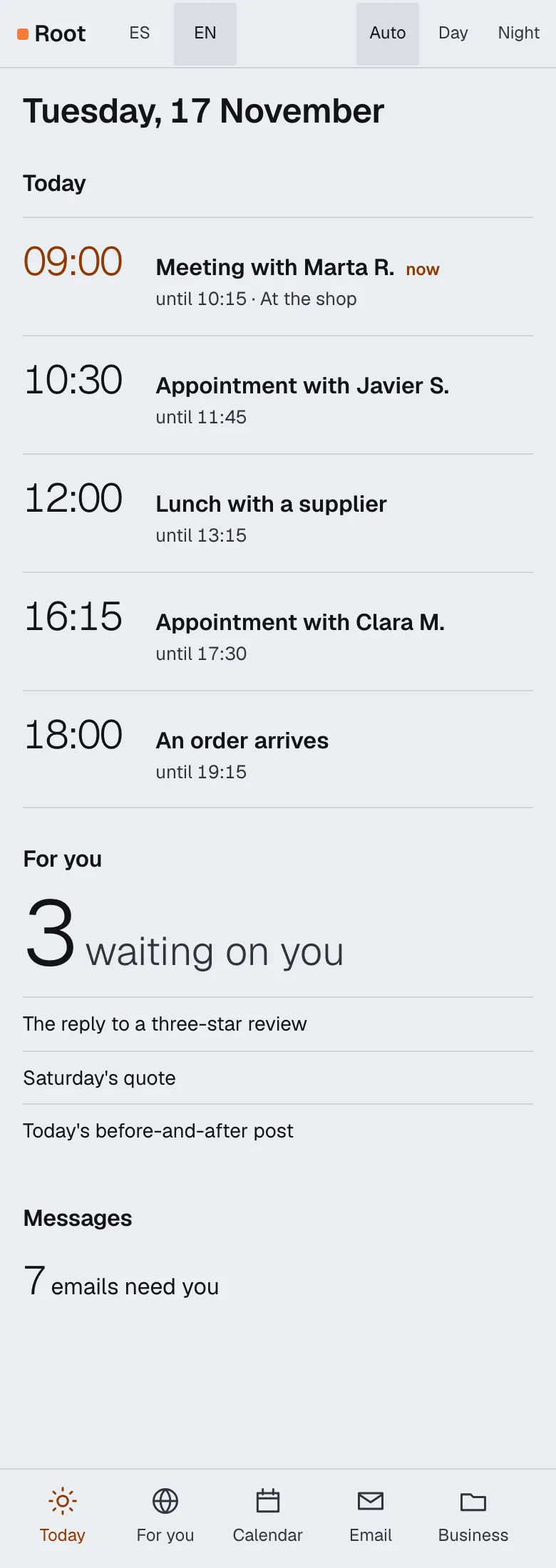
One screen with what Root did and what's waiting for your yes. Tap each tab: it's the same cockpit I work with, shown here with a made-up small business.
Today
Calendar
A Tuesday at the business
- 09:00 Meeting with Marta R. Confirmed
- 10:30 Appointment with Javier S. Confirmed
- 12:00 Lunch with a supplier Reminder sent yesterday
- 14:00 Free slot Root offers it if someone asks
- 16:15 Appointment with Clara M. Confirmed
New appointments go into a free slot. Moving someone waits for your yes.
Seven emails, sorted before you open up
- Pablo G. Waiting for your proposal for Saturday Proposal written, waiting for your yes
- A new client How much is it, and when are you free? Reply from your list, waiting for your yes
- Javier S. Can I move my appointment to Thursday? Two slots offered, waiting for your yes
- Clara M. Thanks for yesterday Read
- A supplier The order arrives at 18:00 Added to the calendar
- Three newsletters This week's offers Archived
Anything that reaches a client waits for your yes. Root sorts the rest on its own.
Business
Not a single client slips away
- Follow-up Saturday's quote has gone four days without an answer Message written
- Bringing them back Clara M. came in seven weeks ago: time for her to come back Reminder ready
- Asking for a review Marta R. left happy this morning Message ready
- Reviews A new three-star review Reply written in your voice
For the first two weeks, every message goes out with your yes. After that, if you like how Root writes, it can go out on its own.
Root
Switched on
- Email Last checked 4 minutes ago Running
- Calendar Last checked 6 minutes ago Running
- Follow-ups Last checked 12 minutes ago Running
- Reviews Last checked 18 minutes ago Running
- Website Last checked 1 hour ago Running
- The night report Yesterday at 21:00 Sent
Example data. This is how you see whether each agent is still running; if one stops, tell me and we fix it together.
Don't lose a single client
You look after your clients. Root makes sure none of them is left without a reply, a follow-up or a reason to come back, and if you want, it brings you new ones.
For the first two weeks Root sends nothing: it learns how you write, or how each person in your business writes. Then you decide. If you like how Root writes, it can run on its own completely.
Follow-ups
If a quote or an appointment goes unanswered, it writes a few days later to pick it back up.
Where it stops: The first two weeks, with your yes. After that, if you like how it writes, it goes out on its own.
Bringing clients back
It knows how often each client comes in. When it's time to come back, it writes to them with your name and in your voice.
Where it stops: The first two weeks, with your yes. After that, if you like how it writes, it goes out on its own.
Asks for the review
When the job is done and the client leaves happy, it asks them for a review.
Where it stops: The first two weeks, with your yes. After that, if you like how it writes, it goes out on its own.
New clients, if you want them
It looks for businesses and people your work would help and prepares the first message.
Where it stops: The first two weeks, with your yes. After that, if you like how it writes, it goes out on its own.
What we set up
It depends on what your business does and what eats your time. These are five we already run, and each one says where it stops.
Your website, up to date
A website that says what you do, where you are and when you open. If you change your hours, Root prepares the change.
Where it stops: The change doesn't go live until you say yes.
Answers prices and hours
The assistant answers by email and on your website what is already on your list.
Where it stops: It answers on its own what's on your list. A discount, it asks you.
Books appointments
Checks your calendar and books the appointment in a free slot.
Where it stops: It books free slots. Moving someone, it asks you.
Replies to reviews
Reads each new review and leaves the reply written in your voice.
Where it stops: It asks you while it learns how you talk. After that, if you want, it replies on its own.
The daily report
Every night, what it did, what it answered and what's waiting for you tomorrow, on one screen.
Where it stops: It tells you. Nothing to touch.
And whatever your business needs next
Most businesses start with these five. If something else eats your time, we look at how your business already works and build the agent or automation for it, with its own line.
Draw your line
Each business decides how far Root goes on its own. Answering prices, yes. Giving discounts, no. Left of the line, Root does it. At the line, it stops and asks you.
This is how it comes: anything that reaches another person, deletes or pays waits for your yes. Change it any time.
Drag the line on each row, or use the arrow keys.
The case A client writes to ask how much it costs to fix their website.
With the line here (as it comes) Root leaves the reply written. You say «send it» and it sends it. Without your word, it stays in Drafts.
With the line as it comes, at «Acts when you ask». What would happen at each point:
- Root does nothing on its own. Root doesn't open your email. The message waits for you, unread.
- Root does everything up to «Reads» on its own. Root reads it and mentions it in your morning report.
- Root does everything up to «Sorts» on its own. Root reads it, tags it as a client and moves it to the top. You write the reply.
- Root does everything up to «Prepares» on its own. Root leaves the reply in Drafts, with your price, without sending anything.
- Root does everything up to «Acts when you ask» on its own. Root leaves the reply written. You say «send it» and it sends it. Without your word, it stays in Drafts.
- Root does everything up to «Sends» on its own. Root replies on its own with the price from your list and tells you afterwards. Only if you set it up that way.
Calendar
The case Someone asks for an appointment on Thursday at ten, and you already have one then.
With the line here (as it comes) You say «give them twelve» and Root replies and books it. Without your word, nothing is confirmed.
With the line as it comes, at «Acts when you ask». What would happen at each point:
- Root does nothing on its own. Root doesn't look at your calendar. You find the clash yourself.
- Root does everything up to «Reads» on its own. Root spots the clash and tells you in your report.
- Root does everything up to «Sorts» on its own. Root marks the clash on your day and shows you the two closest free slots.
- Root does everything up to «Prepares» on its own. Root leaves you a reply with those two slots and the appointment pencilled into your calendar.
- Root does everything up to «Acts when you ask» on its own. You say «give them twelve» and Root replies and books it. Without your word, nothing is confirmed.
- Root does everything up to «Sends» on its own. Root offers the closest free slot and books it on its own. Only if you set it up that way.
Follow-up
The case You sent a quote four days ago and the client hasn't replied.
With the line here (as it comes) You say «send it» and Root sends it. Without your word, it stays written.
With the line as it comes, at «Acts when you ask». What would happen at each point:
- Root does nothing on its own. Root doesn't look at what you sent. If you remember, you write.
- Root does everything up to «Reads» on its own. Root sees there's no reply and tells you in your report.
- Root does everything up to «Sorts» on its own. Root puts it with today's pending things, next to the quote, so it doesn't slip.
- Root does everything up to «Prepares» on its own. Root leaves the follow-up message written, short and in your voice.
- Root does everything up to «Acts when you ask» on its own. You say «send it» and Root sends it. Without your word, it stays written.
- Root does everything up to «Sends» on its own. Root sends the follow-up on its own after four days and tells you. Only if you set it up that way.
Reviews
The case A client leaves a three-star review because they waited twenty minutes.
With the line here (as it comes) You say «post it» and Root posts it. Without your word, it stays written.
With the line as it comes, at «Acts when you ask». What would happen at each point:
- Root does nothing on its own. Root doesn't look at your reviews. You find it yourself.
- Root does everything up to «Reads» on its own. Root reads it and mentions it in your report.
- Root does everything up to «Sorts» on its own. Root moves it to the top with the ones that need a reply and reminds you to answer.
- Root does everything up to «Prepares» on its own. Root leaves the reply written in your voice, apologising for the wait.
- Root does everything up to «Acts when you ask» on its own. You say «post it» and Root posts it. Without your word, it stays written.
- Root does everything up to «Sends» on its own. Root replies on its own to the reviews that fit your rules and tells you. Only if you set it up that way.
How we work with you
One payment to set it up and a monthly fee for the agents we run. The price comes out of the diagnosis, in writing, before we start.
Diagnosis
We talk, look at your business and write down where it gets stuck, what repeats and what you want Root to do.
We install it
We set up the agents and automations in your accounts. For the first weeks, everything waits for your yes.
We run it every month
We review it with you, fix it and move the line wherever you say.
Root is the system, and the agency that runs it
What we install lives in your accounts, built with Root, the system I've used every day since April. Your data doesn't go through my machine.
Let's talk about your business
Tell us what eats your time every week. We'll reply with what we could take off your hands and how we would start.
Write to us root.rap.ai@gmail.com